Businesses in ChatGPT: what it is and how to claim your business
Key takeaways
OpenAI now lets you claim your business in ChatGPT, get a blue check, and see how often ChatGPT mentions you. What changes, what doesn't, and how to claim it step by step.
- OpenAI launched Businesses in ChatGPT in beta on November 10, 2026. In Business Hub you can claim your business, edit its details, add a product feed, and see insights. It's free.
- Claiming takes two approvals: verify the claim (phone, email, DNS record, or Shopify), then pass an ID check with Persona. The blue check, editing, and insights unlock only after the second.
- Online businesses with a website can claim wherever ChatGPT is available, including Europe. Local stores and restaurants can only claim an existing US listing for now.
- Claiming doesn't move you up. OpenAI says it "does not guarantee higher placement or sales".
- Insights cover your own mentions, clicks, and themes over 28 days. No prompts, no competitors, no rankings.
On November 10, 2026, OpenAI launched Businesses in ChatGPT. You can now claim your company inside ChatGPT, correct what it knows about you, and see how often it mentions you. ChatGPT has 1.2 billion weekly users, and until now businesses had no official way to talk to it.
It’s the closest thing to a Google Business Profile for ChatGPT. But claiming doesn’t change where you rank, and the insights only show a small slice.
This guide covers what launched, why it matters, what it doesn’t do, and how to claim your business. It’s based on OpenAI’s announcement, help article, and policy, plus early reports from businesses that went through it.
What is Businesses in ChatGPT?
A beta program with three parts, all in Business Hub at chatgpt.com/business-hub or in the ChatGPT sidebar:
- Claimed profile. Verify you represent the business, then edit its website, description, category, logo, cover photo, and delivery and return policies. A blue check marks it as verified.
- Product feed. Retailers add prices and availability via CSV, a hosted file, or Shopify. ChatGPT may use it to answer product questions.
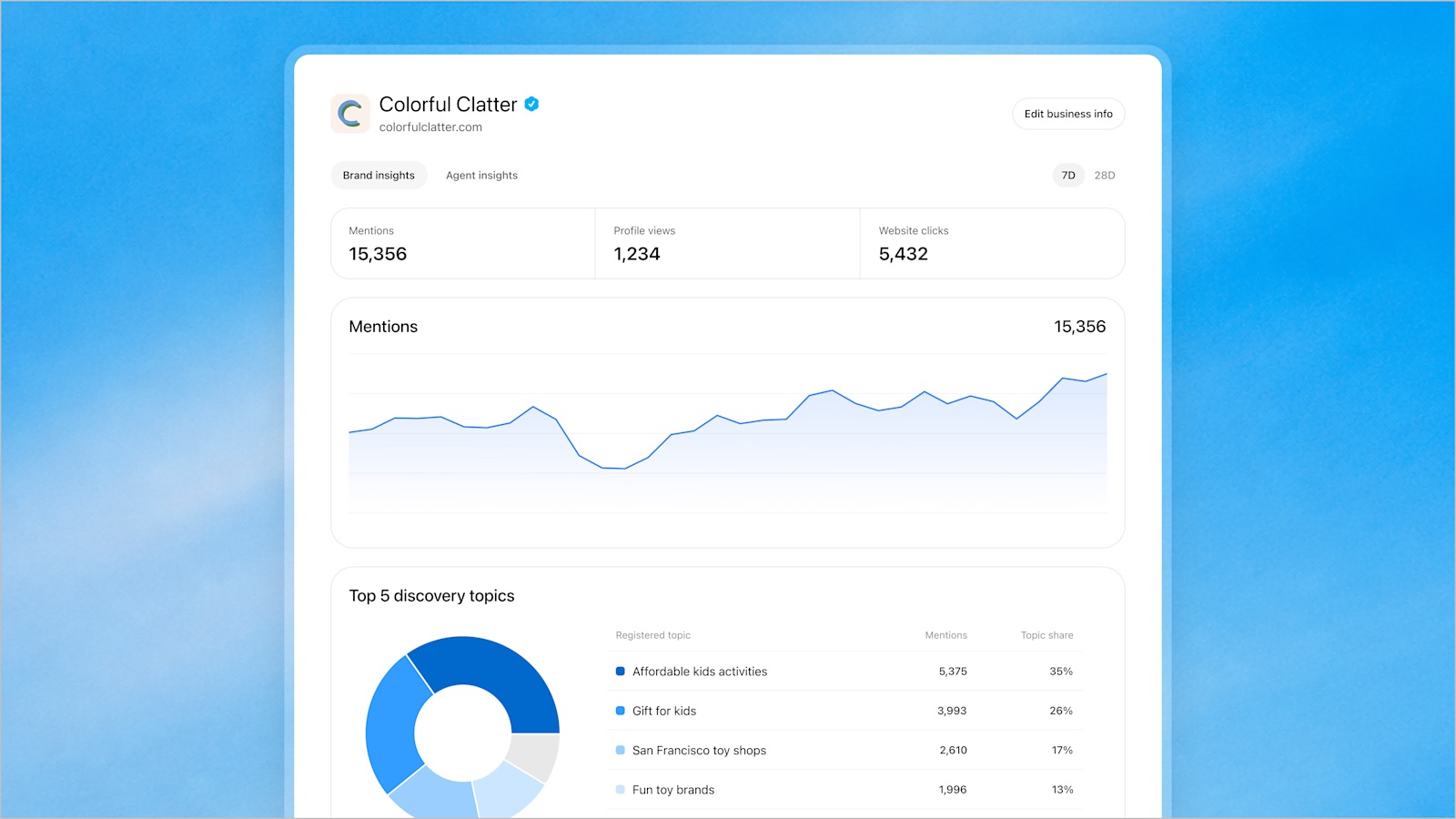
- Insights. How often ChatGPT mentions you, clicks to your site, and the themes of answers you appear in.
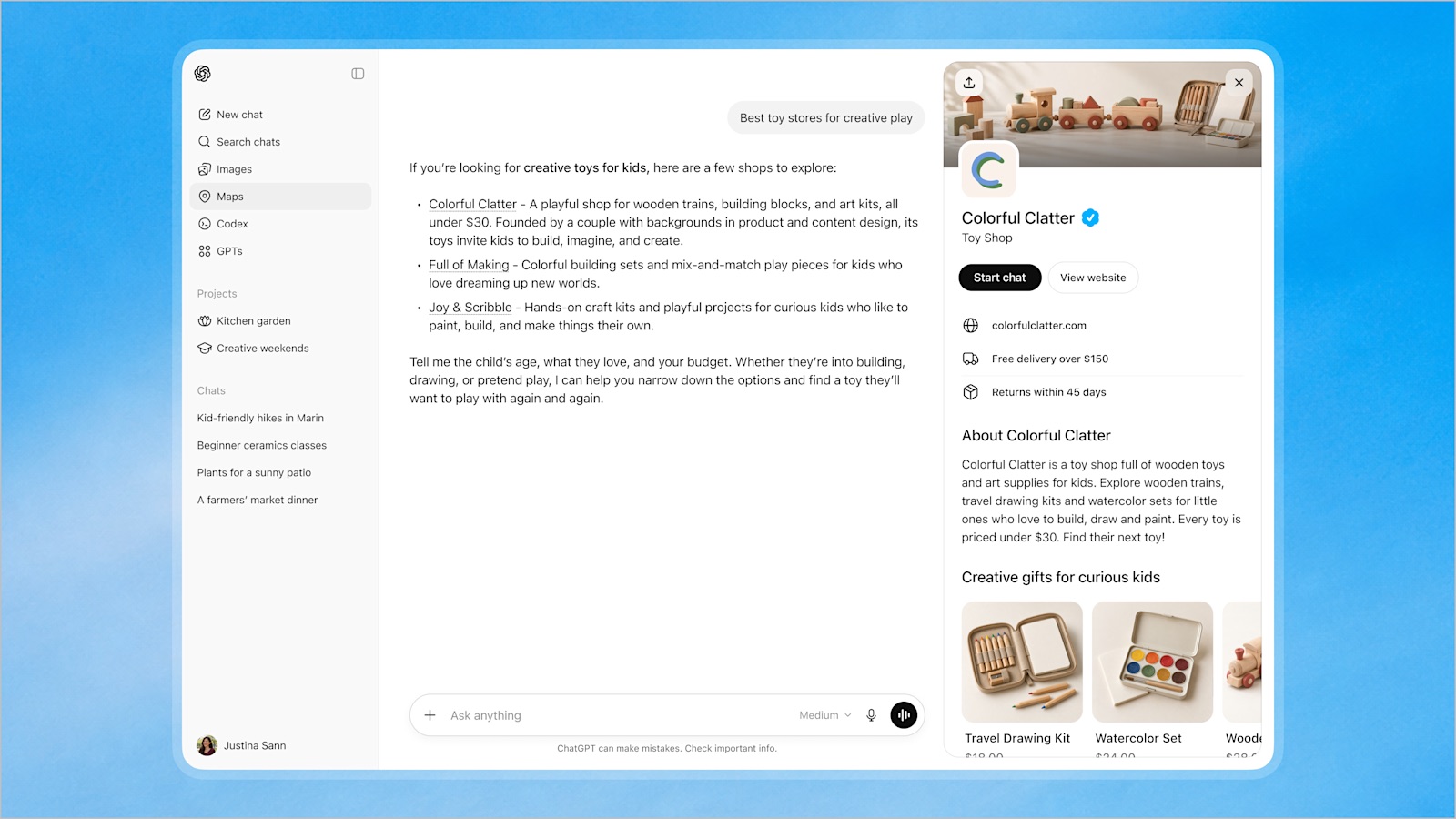
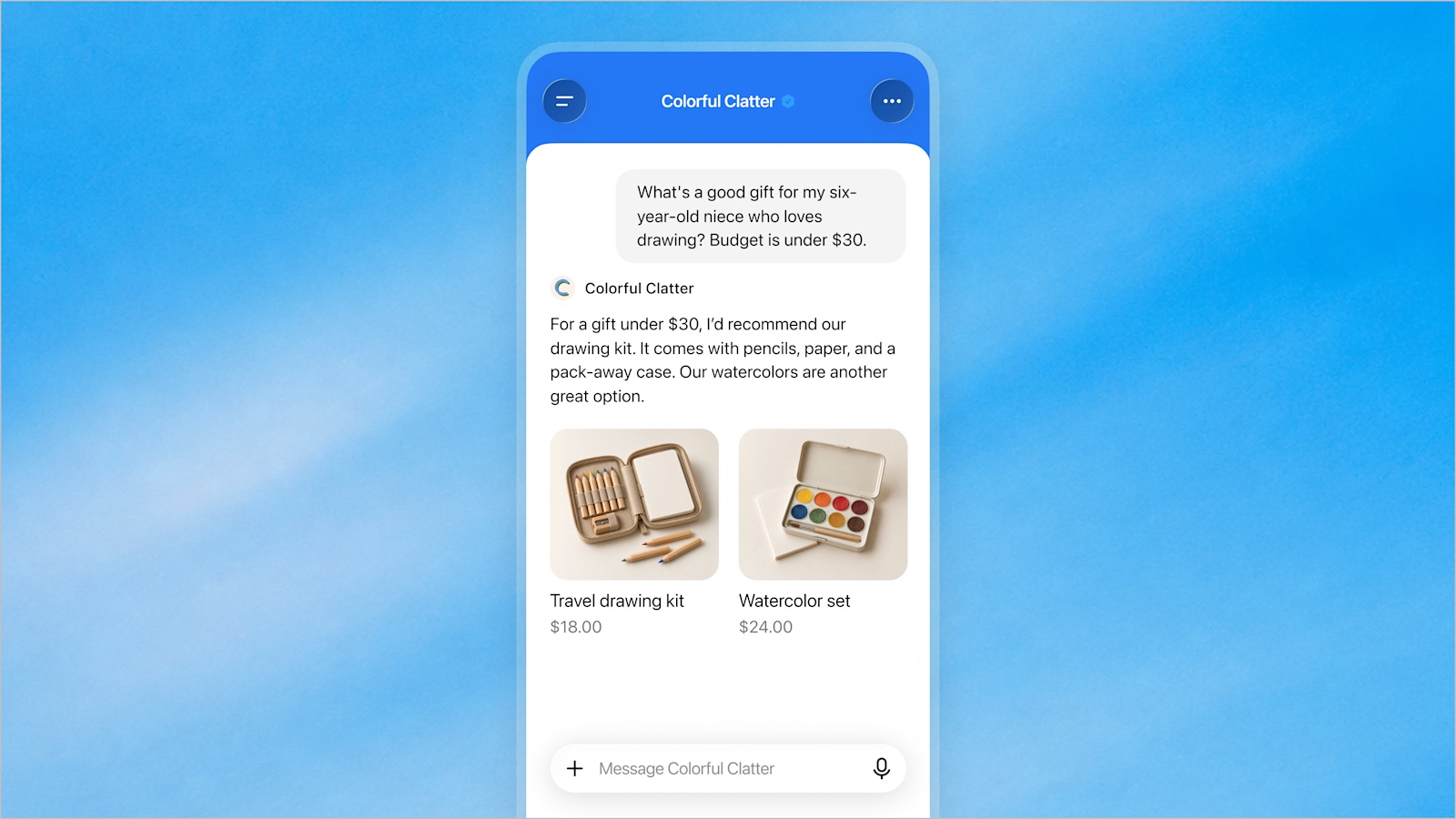
Eligible businesses can also publish a Business Agent: a chat on your profile that answers customer questions from your product and policy info. It’s labeled and separate from ChatGPT’s own answers. For now it’s limited to US ecommerce and online service businesses, and it can’t take payments, bookings, or order lookups. It explains and links to your site.
Why it matters
People ask ChatGPT for recommendations the way they used to search Google. “Best accounting software for a small agency.” “A reliable heat pump installer in Brno.” The answer names a few businesses, often with no results page in sight.
Until now, everything ChatGPT knew about you came from somewhere else: your site, directories, reviews, press. If it had your hours or return policy wrong, you couldn’t fix it. This is the first direct line in.
Three reasons to spend an hour on it now:
- Accuracy. ChatGPT and your agent may repeat your policies word for word.
- The blue check. A verified profile looks more trustworthy, and claiming first stops someone else from doing it.
- First official data. The insights are the first numbers OpenAI has given businesses about how ChatGPT talks about them.
Quartz, FoneArena and Technology.org covered it within a day, and agencies published claim guides the same week. Your competitors will claim theirs soon.
What claiming does not do
OpenAI is direct about this:
“ChatGPT continues to make independent recommendations and comparisons. Claiming does not guarantee higher placement or sales.”
Ads don’t influence the answers either, and ChatGPT keeps using other sources about you. A claimed profile makes your own information accurate. Whether you get named still depends on your website, reviews, directories, and who vouches for you. More on that in Local GEO: how to get your business named in AI answers.
Who can claim a business
- Owners and authorized representatives only. Fake or duplicate profiles break the policy.
- Online businesses with a website can claim wherever ChatGPT is available, including Europe. Not listed? You may be able to add it.
- Local stores and restaurants can only claim an existing US listing for now.
- Business Agents are US-only, for eligible ecommerce and online service businesses (see the Business Agents policy).
- Some categories are on hold until OpenAI has safeguards for them.
- Enterprise customers and advertisers can go through their OpenAI rep.
- Multi-brand companies claim each brand separately. Claiming the brand doesn’t claim its locations.
It’s free. No Ads account or Enterprise plan needed.
How to claim your business in ChatGPT, step by step
The forms take about half an hour. The reviews take a few days.
Before you start
- A company-owned ChatGPT account. The profile is tied to the account that claims it. You can add teammates and an agency later.
- Proof of connection: the business phone or email on file, DNS access, or your Shopify login.
- A government ID and a device with a camera.
- Official business details: exact legal name, address, and registration or tax number. Mismatches are the top reason ID checks fail.
- Crawler access. Don’t block OpenAI’s crawlers in
robots.txtor your firewall. Product feeds require it.
Step 1: Find your listing
Open Business Hub from the ChatGPT sidebar or at chatgpt.com/business-hub. Continuing accepts the Businesses in ChatGPT terms, so read them first. Search for your business and select it.
- Not found: eligible online businesses may see an option to add it.
- “Contact support”: the listing is locked. Request access there.
- Got an email invitation: open the link and sign in with that email address.
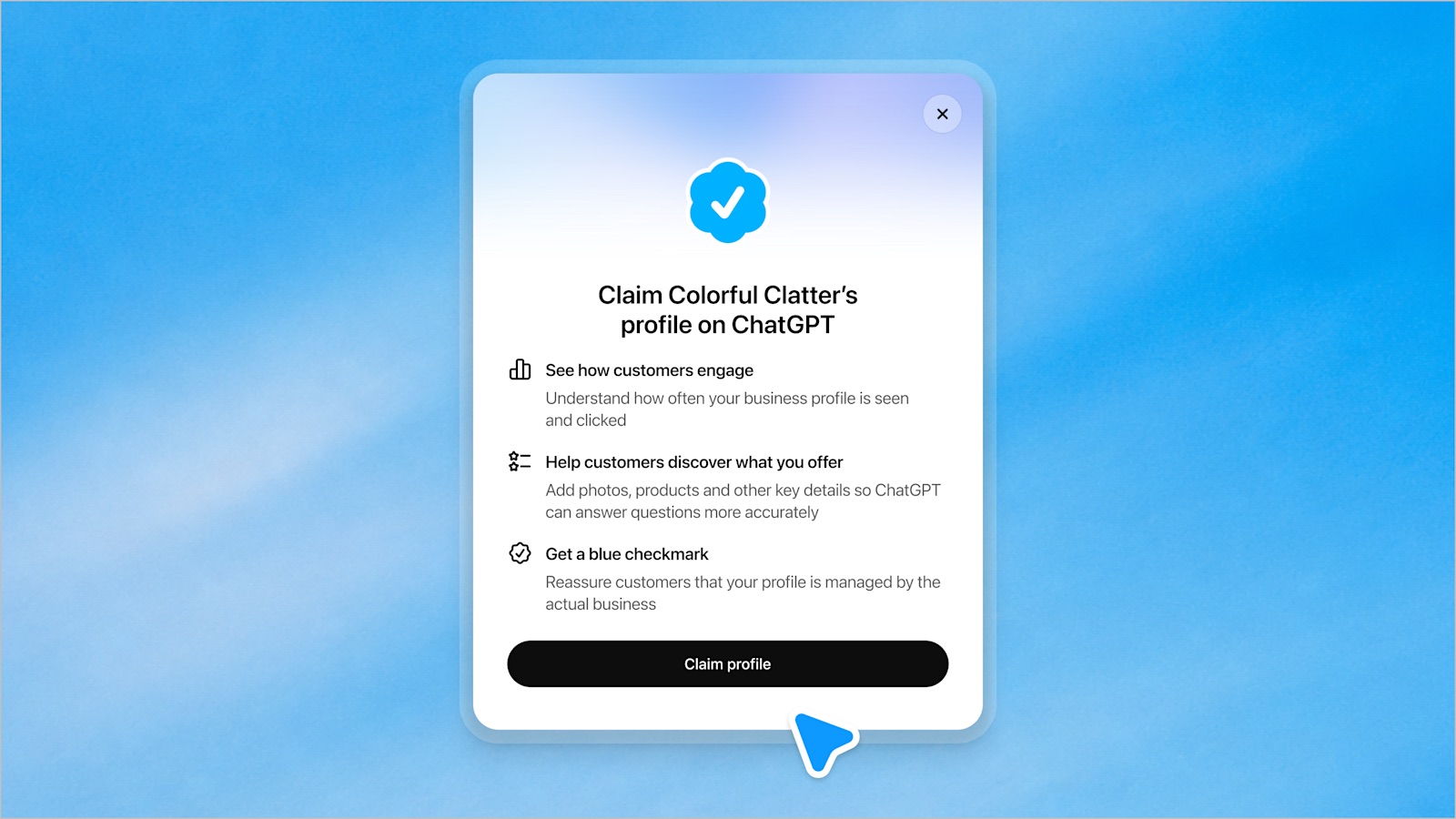
Step 2: Confirm the managing account
This becomes the admin account and is hard to change later. Double-check it.
Step 3: Verify your claim
You’ll see only the methods that fit your business:
- Business phone. Get a code by text or automated call and enter it.
- Business email. Get a code at the business address and enter it.
- Website domain. Add the TXT record to your DNS, then select Verify domain. Copy it exactly. Many DNS providers append your domain to the host automatically, so typing the full host name doubles it. The record expires, so open your DNS panel first.
- Shopify store. Select Connect Shopify and log in to the store.
If you control DNS, use the domain method. It can take a few hours to propagate.
Step 4: Wait for the claim review
OpenAI emails a decision or asks for more info. If someone already claimed your business, open its profile, choose •••, then Dispute ownership.
Step 5: Pass the Persona ID check
Most people miss this one. The claim alone doesn’t give you the blue check. You need to pass an ID check with Persona before you can edit, add a feed, see insights, or create an agent.
In your business overview, select Complete verification with Persona, then Verify. Expect to submit a government ID, and possibly business registration and proof of authorization. Early reports say approval takes a few days.
Creating a new profile? Approval publishes it automatically, so only submit when the details are right.
Step 6: Fill in your profile
Once both approvals are in, open the Business tab and update your website, description, category, logo, cover photo, and policies.
- Write the description for customers: what you do, for whom, where. Early users report a short length limit.
- Treat policies as customer-facing copy. They may be quoted verbatim.
- Match your website and directories. Conflicting facts make you harder to recommend.
OpenAI reviews changes before they go live. Published profiles can’t be deleted, even by support.
Step 7: Optional extras
- Product feed. Upload a CSV per the product feed spec, link a hosted file, or connect Shopify.
- Business Agent. If eligible, test it with common customer questions, fix wrong answers, then Publish.
- Team access. Invite teammates or your agency, each with their own ChatGPT account.
What the insights show, and what they don’t
The Insights tab covers the past 28 days:
- Mentions. For online businesses, only when ChatGPT references your website. Your brand name alone doesn’t count. For local businesses, when ChatGPT shows your location.
- Website clicks. Clicks to your site. Not visits or purchases.
- Discovery topics. Themes of answers that mentioned or cited you.
What’s missing:
- No prompts. Themes only, not the questions.
- No competitors. You don’t see who was named instead of you.
- No answer text. You don’t see what ChatGPT said, or if it was right.
- Only ChatGPT. Not Gemini, Perplexity, AI Overviews, AI Mode, Copilot, Claude, or Grok.
A blank metric doesn’t mean zero. It can mean you’re below the reporting threshold or data is still coming in.
Before you claim: read the terms
Reviewers have flagged two clauses: a release of certain claims against OpenAI, including about content on your own websites, and an override of text-and-data-mining opt-outs once you connect a product feed. Not a reason to skip claiming, but if either matters to you, have a lawyer look first.
FAQ
What is Businesses in ChatGPT?
A beta program OpenAI launched on November 10, 2026. You claim a profile in Business Hub, keep it current, add a product feed, and see insights. Eligible US ecommerce and online service businesses can also publish a Business Agent.
How much does it cost?
Nothing. No Ads account or Enterprise plan needed. Ads are separate and don’t affect ChatGPT’s answers.
Can a business in Europe claim a profile?
Yes, if it’s an eligible online business with a website. Local stores and restaurants can only claim existing US listings for now, and Business Agents are US-only.
Will claiming make ChatGPT recommend me more?
No. It makes your information accurate. Whether you get recommended depends on the rest of the web.
How long does it take?
About half an hour of forms. Codes arrive in minutes, DNS in a few hours, and the two reviews take a few days.
Claim it, then measure it
Claim your business this week. It’s free, it protects your profile, and it gives ChatGPT accurate information. Just don’t mistake the blue check for visibility. The profile fixes what ChatGPT says when it names you. It doesn’t decide whether it names you.
That’s what ChatBakers tracks: which prompts name you on ChatGPT, Perplexity, Gemini, Google AI Overviews and AI Mode, Claude, Copilot and Grok, what the answers say, which competitors appear instead, and which sources get cited. Business Hub tells you how often you’re mentioned. Tracking tells you why.
Sources
- OpenAI (2026, November 10). Introducing Businesses in ChatGPT.
- OpenAI. Businesses in ChatGPT: Claim your business.
- OpenAI Help Center. Setting up your business on ChatGPT.
- OpenAI (2026, November 10). Businesses in ChatGPT policy.
- OpenAI. Business Agents policy.
- Quartz (2026, November 11). OpenAI adds verified business profiles and AI agents to ChatGPT.
- FoneArena (2026, November 11). OpenAI rolls out Businesses in ChatGPT with Business Hub and Business Agents.
- Technology.org (2026, November 11). OpenAI lets businesses claim ChatGPT profiles and launch their own agents.
- DeltaV Digital. How to claim your business in ChatGPT (step by step).
- Tiwari, G. How to claim your business in ChatGPT (Business Hub guide).
Monitor your AI visibility
See how AI models talk about your brand. Start your free 7-day trial.
Start Free Trial →